Best Devices for IPTV Streaming in 2026: Smart TVs, TV Boxes and Firestick
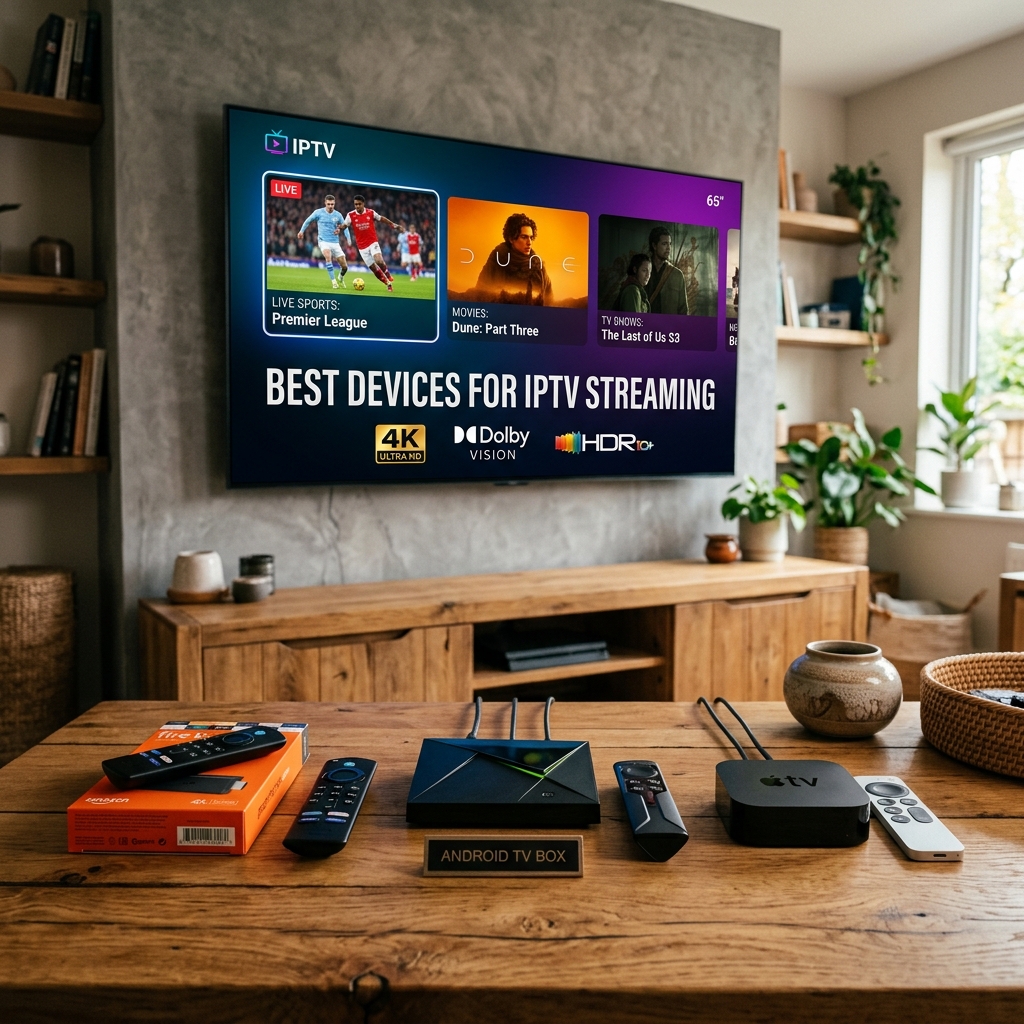
Choosing the right device can make a major difference to your IPTV streaming experience.
The good news is that you do not necessarily need to buy a dedicated IPTV box.
Many modern Smart TVs already support streaming applications, while devices such as Fire TV, Android TV, Google TV, and Apple TV can turn almost any compatible television into a modern streaming setup. (If you are confused about the core differences between live TV delivery models and these apps, see our comparison on IPTV vs streaming services).
The best choice depends on several factors:
- Your TV's resolution
- Supported operating system
- IPTV player availability
- Processing performance
- Network connection
- Storage
- Remote control
- Budget
- Whether you want live TV, on-demand content, or both
There is no single device that is perfect for everyone.
This guide compares the main categories and explains which type of device makes the most sense for different users in 2026.
Only use IPTV services, accounts, playlists, and streams that you are authorized to access.
Best devices for IPTV streaming in 2026
Quick Comparison
| Device Type | Best For | Main Advantage | Main Limitation |
|---|---|---|---|
| Smart TV | Simple setup | No extra hardware | Performance varies by TV |
| Fire TV Stick | Budget and easy upgrades | Compact and affordable | App availability varies by region |
| Android TV / Google TV | Flexibility | Large app ecosystem | Hardware differs by model |
| Android TV Box | Power and connectivity | More ports and performance options | Quality varies significantly |
| Apple TV 4K | Apple users | Smooth interface and strong hardware | More limited IPTV app selection |
| Premium Android TV Box | Power users | Performance and flexibility | Higher cost |
The exact experience depends on the model, operating system version, application, and region.
What Makes a Good IPTV Streaming Device?
Before choosing a device, look beyond the brand name.
A good IPTV streaming device should offer several important characteristics.
1. Good Processing Performance
The device needs enough processing power to handle the IPTV application and decode the video stream smoothly.
This becomes more important when using:
- High-resolution video
- Large channel lists
- Large electronic program guides
- On-demand libraries
- Multiple applications
A more powerful device can also provide faster navigation and quicker application loading. If you end up experiencing unexpected playback errors after setting up your device, see our 20 things to check when IPTV is not working.
2. Reliable Network Connectivity
Your device needs a stable connection to stream video.
Depending on the device, this can be provided through:
- Wi-Fi
- Ethernet
- Both
Ethernet can be particularly useful for a stationary TV setup because it avoids some of the variables associated with wireless connectivity. If you purchase a box but find your IPTV channels are not loading or face an IPTV connection timeout, make sure you check your network settings first.
3. IPTV Application Compatibility
The operating system matters.
Before buying a device, check whether the IPTV player you intend to use is actually available for that platform.
Do not assume that an application available on Android will automatically be available on every Smart TV or streaming platform.
4. Video Format Support
If you plan to watch high-resolution content, check whether the device supports the video formats and resolutions you need.
For 4K streaming, consider:
- 4K output
- Supported codecs
- HDR support
- HDMI capabilities
- Device performance
Likewise, if you find that your chosen IPTV has sound but no picture, it is often a codec or hardware decoding limitation within your device or player.
1. Smart TVs
For many people, the easiest IPTV setup is the Smart TV they already own.
Modern Smart TVs include their own operating system and application store.
Depending on the manufacturer, you may find platforms such as:
- Samsung Tizen
- LG webOS
- Google TV
- Android TV
- Other proprietary Smart TV systems
The biggest advantage is simplicity.
You do not need another box, another remote, or another HDMI connection.
Advantages of Smart TVs
- No additional hardware required
- Clean setup
- One remote
- Large screen
- Built-in Wi-Fi
- Some models support Ethernet
- 4K models are widely available
Disadvantages
Performance varies significantly between TV models.
An older Smart TV may have:
- Slow menus
- Limited application support
- Outdated software
- Limited storage
- Less powerful hardware
This means a modern external streaming device can sometimes provide a better experience than an older Smart TV.
Who Should Choose a Smart TV?
Choose the built-in Smart TV platform if:
- Your TV is relatively modern.
- Your preferred IPTV application is supported.
- The TV performs smoothly.
- You want the simplest setup.
- You do not want another device.
2. Amazon Fire TV Stick
Fire TV devices are popular because they are compact, relatively simple to install, and designed specifically for television streaming.
Different Fire TV models offer different levels of performance and video capabilities.
For IPTV users, the important factors are:
- Application availability
- Resolution support
- Wi-Fi capabilities
- Storage
- Processing performance
- Remote control
Do not choose a Fire TV model based solely on the word "4K."
Check the complete specifications of the exact generation and model available in your region.
Advantages
- Compact design
- Easy TV installation
- Good application ecosystem
- Multiple models available
- Supports high-resolution streaming on compatible models
- Convenient remote control
Disadvantages
- Some IPTV applications may have different availability depending on region.
- The interface is designed around the broader Fire TV ecosystem.
- Storage can be limited on some models.
- Users should verify application compatibility before purchasing.
Who Should Choose Fire TV?
Fire TV is a strong choice if you want:
- A small streaming device
- An easy upgrade for an older TV
- A familiar streaming interface
- Good mainstream application support
- A relatively simple setup
3. Android TV and Google TV Devices
Android TV and Google TV devices are particularly interesting for users who value application flexibility.
Depending on the device, you may have access to a large selection of applications through Google Play.
Examples of hardware categories include:
- Google TV streamers
- Android TV boxes
- Android TV televisions
- Certified third-party streaming devices
The exact experience depends heavily on the hardware manufacturer.
Advantages
- Broad application ecosystem
- Flexible interface
- Multiple hardware choices
- Support for many streaming applications
- Available at different price levels
Disadvantages
Not every Android-based box offers the same quality.
Cheap devices can have:
- Slow processors
- Limited updates
- Poor Wi-Fi
- Inconsistent software
- Limited certification
This is why buying a reputable, properly supported device is more important than simply choosing the cheapest Android TV box.
4. Android TV Boxes
A dedicated Android TV box can be a good choice if you want more connectivity and flexibility than a small streaming stick provides.
Depending on the model, an Android TV box may offer:
- Ethernet
- USB ports
- More storage
- More RAM
- Better cooling
- Additional connectivity
This can be useful for users who maintain large IPTV libraries or use several streaming applications.
However, the Android TV box market includes a very wide range of hardware quality.
What to Check Before Buying an Android TV Box
Look for:
- Official platform support
- Reliable manufacturer
- Regular software updates
- Sufficient RAM
- Adequate storage
- 4K support if required
- Good Wi-Fi
- Ethernet if needed
- Compatible application ecosystem
Avoid choosing a box purely because it advertises a large number of channels or applications.
The device and the IPTV service are separate products.
5. Apple TV 4K
Apple TV 4K is a premium streaming device designed for users who value a polished interface, strong hardware, and integration with Apple's ecosystem.
It can be particularly attractive if your household already uses:
Apple TV generally provides a smooth and responsive interface.
However, IPTV application availability can differ from Android-based platforms.
Before purchasing, check that your preferred IPTV player is available on the current tvOS App Store in your region.
Advantages
- Smooth interface
- Strong hardware
- Excellent integration with Apple devices
- High-quality 4K output
- Good long-term streaming experience
Disadvantages
- Usually more expensive than budget streaming sticks
- More limited application flexibility than Android-based platforms
- IPTV application availability must be checked before purchase
6. Premium Android TV Devices
Power users may prefer a premium Android TV device.
A well-equipped premium box can offer:
- Faster processing
- More storage
- Better connectivity
- Ethernet
- Advanced video processing
- Better handling of large applications and libraries
One commonly discussed premium option is the NVIDIA Shield TV Pro, which remains relevant for users who prioritize Android TV flexibility and higher-end hardware.
However, a premium device is not necessary for everyone.
If you only watch standard HD content, spending significantly more may provide little practical benefit.
7. Which Device Is Best for 4K IPTV?
If 4K is important to you, consider more than the "4K" label.
Check:
- Native 4K output
- Supported codecs
- HDR support
- HDMI version and capabilities
- Processor performance
- Wi-Fi performance
- Ethernet availability
Your television also needs to support the required resolution and formats.
A 4K-capable streaming device cannot turn a non-4K television into a true 4K display.
8. Ethernet vs Wi-Fi
Network connectivity can influence your streaming experience.
Wi-Fi
Wi-Fi is convenient and usually sufficient when:
- The router is reasonably close.
- The signal is stable.
- The network is not heavily congested.
Modern Wi-Fi standards can provide high performance under good conditions.
Ethernet
Ethernet is useful when:
- The TV is close to the router.
- You want a wired connection.
- Wi-Fi is unstable.
- The device supports Ethernet.
For a fixed home entertainment setup, Ethernet can be a useful option.
9. How Much Storage Do You Need?
IPTV itself does not necessarily require huge storage.
However, storage becomes useful when you install:
- Multiple streaming applications
- Large applications
- Media players
- Utility applications
- Other entertainment apps
For a simple setup, moderate storage may be sufficient.
Power users may prefer additional storage.
Do not pay a large premium for storage you will never use.
10. Does RAM Matter for IPTV?
RAM can influence how smoothly a device handles applications and multitasking.
However, more RAM does not automatically mean better video quality.
Other factors matter too:
- CPU performance
- GPU/video decoder
- Operating system
- Application optimization
- Network quality
Consider the complete hardware rather than one specification.
11. What About Roku?
Roku devices are excellent mainstream streaming products, but IPTV application compatibility can be more limited than on Android-based platforms.
If your main priority is IPTV flexibility, verify the exact applications available on Roku before purchasing.
If your preferred IPTV application is not supported, another platform may be more suitable.
12. What About Phones and Tablets?
You do not need a television device to use IPTV.
Compatible smartphones and tablets can also be useful for:
- Travel
- Secondary viewing
- Testing an account
- Watching away from the main TV
Android and iOS devices have different application ecosystems, so check compatibility before choosing a player.
Best Device by User Type
Best for Beginners
Modern Smart TV or Fire TV device
Choose this if you want a simple setup with minimal hardware.
Best for Flexibility
Android TV / Google TV
Choose this if application choice and customization are important.
Best for Existing Smart TV Owners
Keep the Smart TV
If your TV already runs smoothly and supports the applications you need, there may be no reason to purchase additional hardware.
Best for Power Users
Premium Android TV device
This makes more sense if you use demanding applications, large libraries, or want additional connectivity.
Best for Apple Users
Apple TV 4K
A strong option if you already use Apple's ecosystem and your preferred IPTV application is available.
Best for Budget Upgrades
Streaming stick
A compact streaming stick can be a practical way to upgrade an older television without replacing the TV itself.
Device Comparison
| Category | Smart TV | Fire TV | Android/Google TV | Android TV Box | Apple TV |
|---|---|---|---|---|---|
| Extra hardware | No | Yes | Yes/Depends | Yes | Yes |
| Setup simplicity | Excellent | Excellent | Very good | Good | Excellent |
| App flexibility | Depends on TV | Good | Very good | Very good | Moderate |
| 4K options | Widely available | Available on selected models | Available | Available | Yes |
| Ethernet | Model dependent | Model dependent | Model dependent | Common on some models | Available on selected models |
| Best for | Simplicity | Easy upgrade | Flexibility | Power users | Apple ecosystem |
| Price range | Built into TV | Budget to mid-range | Budget to premium | Budget to premium | Premium |
The exact features depend on the individual model and region.
How to Choose the Right IPTV Device
Before buying, answer these questions:
1. What TV do you have?
If you already have a modern Smart TV, you may not need another device.
2. What resolution do you need?
For Full HD, almost any modern streaming device can be sufficient.
For 4K, verify the complete video specifications.
3. Which IPTV player do you want?
Check whether it is officially supported on your chosen platform.
4. How good is your network?
If Wi-Fi is unreliable, consider a device with Ethernet or improve your network first.
5. How much do you want to spend?
Do not buy a premium device simply because it has higher specifications.
6. Do you need additional apps?
If you use many applications, choose a platform with a suitable app ecosystem and sufficient storage.
Common Mistakes When Buying an IPTV Device
Avoid these mistakes:
Buying Based Only on Price
The cheapest Android box is not necessarily the best value.
Buying 4K Hardware for a 1080p TV
You may gain little from the additional capability.
Ignoring Application Compatibility
Always check whether the player you want works on the operating system.
Ignoring Network Connectivity
A powerful device cannot compensate for an unstable network.
Buying an Unknown Android Box
Cheap hardware can come with poor software support and inconsistent performance.
Assuming More RAM Solves Everything
RAM is only one component of overall performance.
Frequently Asked Questions
What is the best device for IPTV in 2026?
There is no universal winner. Smart TVs are convenient, Fire TV devices are practical for many users, Android/Google TV offers flexibility, and premium devices suit users who want more performance.
Is Firestick good for IPTV?
A compatible Fire TV device can be a convenient IPTV platform, but you should verify that your preferred IPTV application is officially supported in your region.
Is Android TV better than Smart TV for IPTV?
It depends on the television. Android TV can provide greater application flexibility, while a modern Smart TV can be simpler because no additional hardware is required.
Do I need an IPTV box if I have a Smart TV?
Not necessarily. If your Smart TV is modern, performs well, and supports the IPTV application you want, additional hardware may not be necessary.
Is Apple TV good for IPTV?
Apple TV 4K offers strong hardware and a polished interface, but you should verify the availability of your preferred IPTV application on tvOS before purchasing.
Do I need a 4K device for IPTV?
Only if you want to watch 4K content and your television supports it. A Full HD setup does not require 4K hardware.
Is Ethernet better than Wi-Fi for IPTV?
Ethernet can provide a stable wired connection and may be preferable for a fixed TV setup, but a good Wi-Fi connection can also work very well.
How much RAM should an IPTV device have?
There is no single RAM requirement for IPTV. Look at the overall hardware, operating system, video decoding capabilities, and application support rather than RAM alone.
Can I use IPTV on my phone?
Yes, compatible IPTV applications can run on smartphones and tablets, depending on the operating system and service.
Are cheap Android TV boxes worth buying?
Some can offer good value, but quality varies widely. Check certification, software updates, hardware specifications, application compatibility, and manufacturer reputation before buying.
Conclusion
The best IPTV streaming device in 2026 depends on your priorities.
If you already own a modern Smart TV, you may not need additional hardware.
If you want a simple and compact upgrade, a compatible Fire TV device can be a practical option.
If application flexibility is important, Android TV and Google TV devices provide a wide range of choices.
If you want more performance and connectivity, a premium Android TV box may make sense.
Apple TV 4K is also an attractive option for users who are already invested in Apple's ecosystem.
Most importantly, do not choose a device based only on price, RAM, or a "4K" label.
Check the operating system, IPTV application compatibility, network options, video capabilities, software support, and your actual viewing needs.
A well-matched device can provide a smooth IPTV experience without requiring you to spend more money than necessary.
Related Articles: