
IPTV Buffering After a Few Minutes: Causes and Solutions

The stream starts normally, everything looks fine, and then after a few minutes the picture starts freezing or the loading icon appears.
This is one of the most frustrating streaming problems. You know your IPTV service works because it successfully connected and played, but it simply cannot maintain continuous playback.
Understanding why this specific pattern happens is the key to fixing it. This is different from IPTV failing to load entirely. When a stream works for 5 to 10 minutes and then freezes, you are likely dealing with network instability, Wi-Fi fluctuations, network congestion, insufficient sustained bandwidth, device overheating, or player issues.
In this guide, we will systematically identify and fix the causes of IPTV buffering after a few minutes so you can enjoy uninterrupted Starshare IPTV.
🚀 Get the Best Streaming Experience with Starshare IPTV!
Stop dealing with constant buffering. Upgrade to Starshare IPTV today and enjoy stable 4K, Full HD, and HD streams with our premium infrastructure.
Quick Answer: Why Does IPTV Buffer After a Few Minutes?
Buffering after several minutes often indicates a problem with sustained connection stability, available bandwidth, device performance, player behavior, or the specific stream.
A high-speed internet connection does not automatically guarantee smooth IPTV. While raw speed is important, live streaming requires extreme stability.
The difference between speed, stability, latency, packet loss, and network congestion is critical. You might have 500 Mbps download speed, but if your Wi-Fi drops packets every few minutes, the stream will buffer. Always perform basic diagnostic tests before assuming the provider is at fault.
IPTV Buffering vs IPTV Not Loading: What's the Difference?
It is important to classify your problem correctly.
IPTV Not Loading
The stream never starts. It stays on a black screen or shows a timeout error. For this, check our guide on IPTV Channels Not Loading.
IPTV Buffering
The stream starts successfully but cannot maintain continuous playback. The loading indicator appears frequently while the app waits for more data.
IPTV Freezing
The picture stops or pauses repeatedly, sometimes with audio continuing in the background.
IPTV Disconnecting
The stream stops completely and may need to reconnect manually.
1. Your Internet Connection May Be Unstable
A connection can appear fast while still experiencing packet loss, latency spikes, jitter, speed fluctuations, or temporary drops.
Live streaming needs continuous, uninterrupted data delivery. Unlike downloading a file where a temporary dip in speed goes unnoticed, IPTV requires sustained throughput.
Practical Tests:
- Run a speed test before starting IPTV.
- Run another speed test immediately when the buffering begins.
- Compare the results to see if there is a massive drop in speed.
- Test another streaming service to see if the issue is network-wide.
- Check whether other devices are using the network concurrently.
2. Wi-Fi Can Become Unstable During Playback
Your device can show a strong Wi-Fi signal while still experiencing severe instability.
Factors affecting Wi-Fi during playback include:
- Distance from the router
- Walls and physical obstructions
- Wireless interference from microwaves or Bluetooth devices
- Network congestion from neighbors
- 2.4 GHz vs 5 GHz limitations
- Poor router placement
While 5 GHz offers higher speeds, it has a shorter range. 2.4 GHz penetrates walls better but is often crowded and slower. Ethernet is usually preferable when stability is paramount.
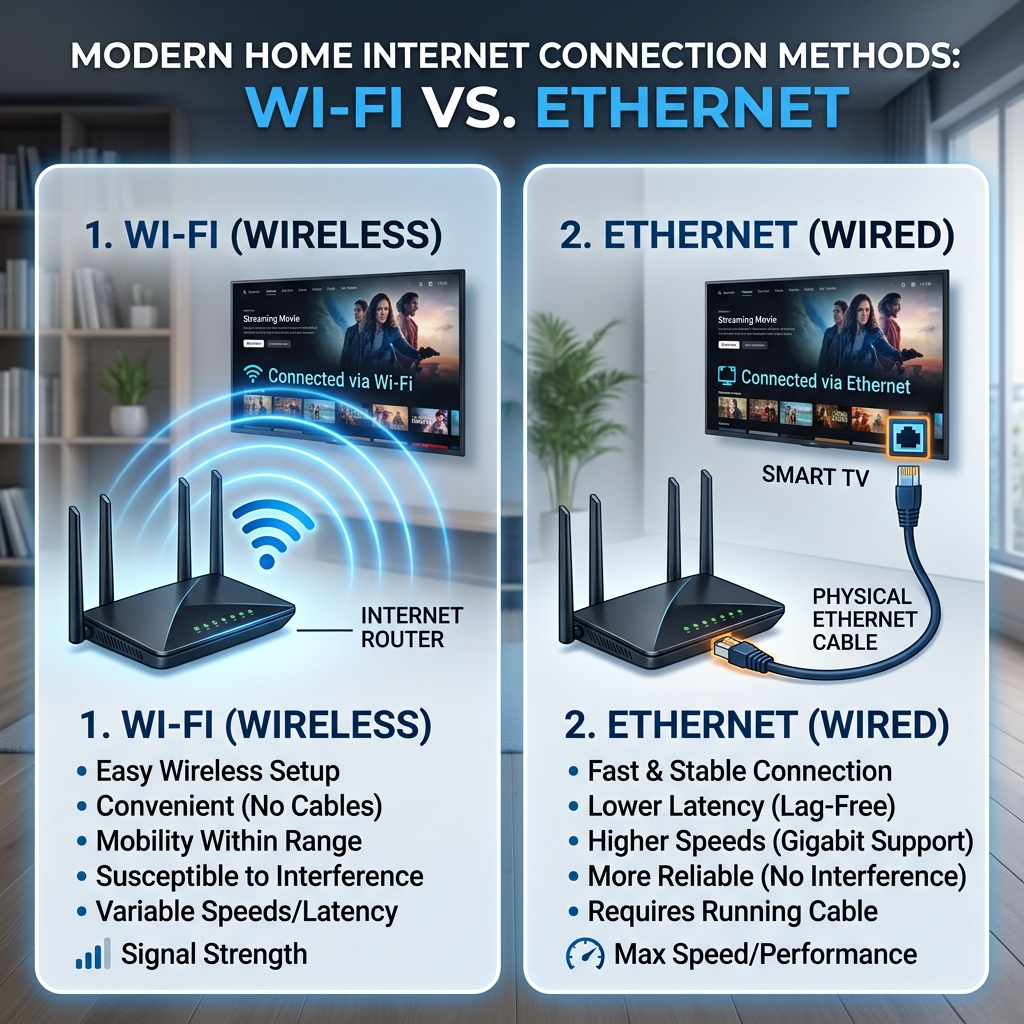 Wi-Fi vs Ethernet connection for IPTV buffering
3. Test IPTV With Ethernet
Ethernet is the ultimate diagnostic test for buffering issues.
If you connect your device via Ethernet and the stream becomes completely stable, Wi-Fi is heavily suspected. If Ethernet still results in buffering, the problem lies deeper in your network, device, or service.
Ethernet does not fix every IPTV problem, but it successfully isolates wireless networking as a possible cause.
4. Other Devices May Be Consuming Bandwidth
Your IPTV might start normally and begin buffering once the network becomes congested by other users in your home.
Common bandwidth hogs:
- Netflix or YouTube on another TV
- Large game updates downloading in the background
- Cloud backups syncing from phones or computers
- Multiple video calls
- Smart home devices
Solutions:
- Pause large downloads while streaming live sports.
- Stop unnecessary streams.
- Disconnect unused devices.
- Test your IPTV when the network is completely quiet.
5. Your Router May Need Attention
Routers process millions of packets per second. Over time, they can develop temporary routing errors, overheating issues, or memory leaks.
Issues to consider:
- Temporary network states
- Too many connected devices
- Router overheating
- Outdated firmware
- Poor placement (hidden in a cabinet)
- Long continuous uptime
Recommended steps:
- Restart the router by unplugging it for 30 seconds.
- Wait for the connection to fully return.
- Restart the IPTV device.
- Test the stream again.
Restarting does not fix every issue, but it clears temporary network faults effectively.
6. Your Streaming Device May Be Struggling
Older Smart TVs, early-generation Fire TV devices, and cheap Android TV boxes often lack the processing power for sustained high-bitrate decoding.
A device may start playback successfully because its initial RAM is clear, but struggle after sustained playback due to limited RAM, weak processors, background applications, low storage, or overheating.
Practical steps:
- Restart the device to clear its memory.
- Close background applications.
- Free up internal storage space.
- Update the operating system.
- Test another compatible device, like a powerful smartphone or PC, to see if the buffering stops.
📺 Upgrade Your Viewing Experience!
Ready for a superior streaming experience? Starshare IPTV offers massive channel lineups, VODs, and reliable servers. Join the thousands of satisfied users today.
7. Device Overheating Can Cause Playback Problems
Sustained video decoding generates significant heat, especially when streaming 4K content on small dongles hidden behind a hot television.
Symptoms:
- Playback begins normally.
- The device becomes physically hot to the touch.
- Menu performance decreases.
- Video begins freezing or dropping frames.
- The application becomes unstable.
Suggestions:
- Improve ventilation behind the TV.
- Avoid enclosing the device in cabinets.
- Keep vents unobstructed.
- Unplug the device and allow it to cool completely before testing again.
8. The IPTV Player May Be Causing the Buffering
Not all IPTV player apps are optimized equally. The player itself might be the bottleneck.
Consider:
- Outdated application versions
- Corrupted cache
- Incorrect playback settings
- Hardware decoding vs Software decoding compatibility
- Background processes conflicting with the player
Recommend:
- Restart the app completely.
- Update the app from the official store.
- Clear the cache where appropriate in device settings.
- Test another compatible player.
- Change only one playback setting at a time (e.g., toggling hardware acceleration).
Do not recommend suspicious modified applications, as they often introduce malware or extreme instability.
9. High-Bitrate Streams Can Buffer More Easily
There is a direct relationship between resolution, bitrate, network stability, and device capability.
4K streams demand significantly more sustained data than lower-resolution streams. A network that can perfectly handle a 5 Mbps HD stream might instantly buffer when asked to maintain a 25 Mbps 4K stream for ten minutes straight.
Resolution alone does not determine buffering; the actual bitrate (the amount of data processed per second) is what stresses the network.
10. Why 4K IPTV May Start Buffering After a Few Minutes
4K requires exceptional conditions:
- Higher sustained bitrate
- Intensive device decoding power
- Perfect network stability
- Wi-Fi limitations become obvious
- Router processing performance is tested
- TV/device compatibility is pushed to the limit
Useful Test: Try switching the stream from 4K to Full HD, or Full HD to HD. If the lower resolution remains stable while 4K repeatedly buffers, investigate your bandwidth, device capability, or the specific 4K stream. Lowering quality doesn't fix the underlying issue, but it proves where the bottleneck might be.
11. Does the Problem Happen on Every Channel?
This is a crucial diagnostic test.
Test several regular channels, sports channels, HD channels, 4K channels, and different categories.
If only one or a few channels buffer, the issue may be stream-specific. If every channel buffers after several minutes, investigate your network, device, player, account, or broader service-side issues.
12. Live Sports Can Stress Streaming More Than Regular Channels
Major live events often involve high simultaneous demand, high-bitrate streams, and 4K broadcasts, which inherently use greater network resources.
The sheer volume of concurrent traffic globally can sometimes cause localized routing bottlenecks.
13. ISP Peak-Hour Congestion
Internet performance can vary significantly depending on the time of day and local network conditions.
Compare daytime performance versus evening performance. During the evening, your ISP's local node might be congested as everyone in your neighborhood streams video simultaneously.
Record your download speed, ping, latency, and jitter (if available) during both times to identify peak-hour congestion.
14. Can a VPN Fix IPTV Buffering?
A VPN is not a guaranteed buffering fix. It may sometimes change the routing path your data takes, which could improve or worsen performance depending on the specific network bottleneck.
Compare your stream without a VPN versus with a VPN under similar conditions. If the VPN consistently resolves the buffering, your ISP might be experiencing routing issues to the IPTV server.
15. Can Changing DNS Stop IPTV Buffering?
DNS primarily affects domain-name resolution (translating URLs into IP addresses). It does not magically increase bandwidth or connection stability.
While a DNS change (like using Google or Cloudflare DNS) may help certain connectivity issues or initial loading times, it should not be presented as a universal buffering solution.
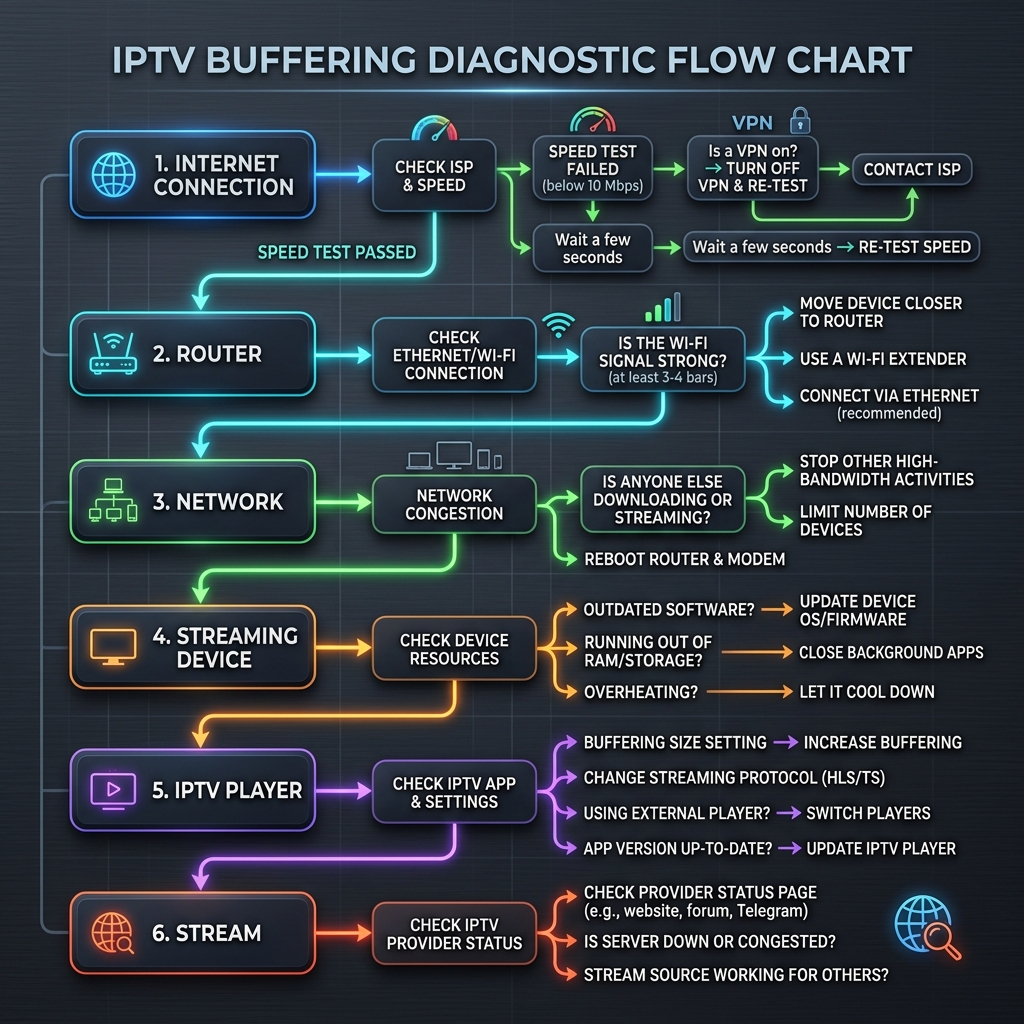 Starshare IPTV buffering troubleshooting guide
Step-by-Step Fix for IPTV That Buffers After a Few Minutes
Follow this practical procedure:
- Restart the IPTV app.
- Restart the streaming device.
- Restart the router.
- Check internet speed at the device location.
- Test another streaming service to compare performance.
- Disconnect unnecessary devices from your network.
- Test 5 GHz Wi-Fi where appropriate for higher speeds.
- Test Ethernet to isolate wireless issues.
- Test another IPTV channel to see if it is a localized issue.
- Test HD instead of 4K to check for bandwidth bottlenecks.
- Update the IPTV player to the latest version.
- Clear the app cache if available in your device settings.
- Check device storage (delete unused apps).
- Check device temperature (allow it to cool if hot).
- Test another compatible player.
- Test another compatible device (like your smartphone).
- Compare daytime vs evening performance.
- Contact authorized support if the issue persists across all devices and networks.
How to Identify the Real Cause
| What You Test | Result | What It Suggests |
|---|---|---|
| IPTV buffers + all streaming buffers | Network issue likely | Check router and ISP connection |
| IPTV buffers but other streaming is stable | IPTV/player/network-specific issue possible | Try another player or device |
| Wi-Fi buffers + Ethernet works | Wi-Fi issue likely | Improve Wi-Fi signal or stay wired |
| 4K buffers + HD works | Bandwidth/device/stream bitrate issue possible | Network or device bottleneck |
| One channel buffers | Channel/stream-specific issue | Use alternative channels |
| Every channel buffers | Network/device/service issue possible | Run full diagnostic steps |
| One player buffers + another works | Player compatibility issue likely | Use the working player |
| One device buffers + another works | Device/app issue likely | Update or upgrade the device |
| Day works + evening fails | Peak-hour congestion possible | ISP or routing bottleneck |
| Same problem on multiple devices | Network/service issue more likely | Verify network stability or contact support |
Troubleshooting IPTV Buffering With Starshare IPTV
If you are experiencing buffering with your Starshare IPTV service, we recommend first collecting useful diagnostic information before assuming an outage.
Test different channels, different resolutions, and Wi-Fi vs Ethernet. Try the stream on different compatible devices and players to isolate the problem. Note whether the issue happens during the day or only in the evening.
If the problem continues across multiple compatible devices while your network appears completely stable and fast, please contact Starshare IPTV support with your diagnostic findings so we can assist you effectively.
Frequently Asked Questions About IPTV Buffering
Why does IPTV buffer after a few minutes?
It usually indicates a sustained connection problem, overheating device, or network congestion that only becomes apparent after streaming continuously for a period.
Why does IPTV work at first and then freeze?
Your device's memory cache might fill up, the device might overheat, or background network traffic might suddenly consume the available bandwidth.
Why does IPTV buffer even when my internet is fast?
Raw speed is different from stability. Packet loss, latency spikes, jitter, or Wi-Fi interference can cause buffering even on a gigabit connection.
Can Wi-Fi cause IPTV buffering?
Yes, Wi-Fi is highly susceptible to interference, distance limitations, and packet loss, all of which directly cause buffering in live streams.
Is Ethernet better for IPTV?
Ethernet provides a dedicated, interference-free connection, making it vastly superior to Wi-Fi for live streaming stability.
Why does 4K IPTV buffer more than HD?
4K streams require significantly higher sustained bandwidth and decoding power, placing much more stress on your network and device.
Can my IPTV player cause buffering?
Yes, an outdated or poorly optimized player might struggle to decode high-bitrate streams efficiently.
Can an overheating device cause IPTV buffering?
Absolutely. Overheating causes the processor to throttle, which drops frames and interrupts video decoding.
Can too many devices cause IPTV buffering?
Yes, other devices downloading or streaming will consume your total available bandwidth, leaving insufficient data for the IPTV stream.
Can a VPN fix IPTV buffering?
It is not a guaranteed fix, but it can sometimes route your traffic around local ISP congestion bottlenecks.
Can changing DNS fix IPTV buffering?
No, DNS primarily affects domain resolution, not the sustained bandwidth required for streaming video.
Why does only one IPTV channel buffer?
That specific channel might have source issues, temporary server routing problems, or an exceptionally high bitrate.
Why does IPTV work on one device but buffer on another?
Different devices have varying processing power, Wi-Fi antennas, and software optimization.
When should I contact Starshare IPTV support?
After you have verified your network stability, tested Ethernet, checked multiple devices, and ensured the problem is consistent across multiple channels.
Final Thoughts
Buffering after several minutes is noticeably different from IPTV failing to load entirely. Network stability matters just as much as raw speed. Wi-Fi can be a major factor in dropped packets, which is why testing with Ethernet is so useful.
Device performance matters heavily, especially when dealing with high-bitrate 4K streams that demand sustained resources. While provider-side problems are possible, they should not be assumed immediately until local network and hardware diagnostics are complete.
By following a structured troubleshooting approach, you can quickly identify the bottleneck and return to enjoying your Starshare IPTV setup.
Related Articles: